
From a voice note to a useful team answer.
See how Emily and SPARX help run Son Hábitos, our Spanish-language coaching business: a voice request, a useful report, a closer look at the data, and a handoff the team can act on.
An internal operating case from the founder’s own business. This is not an independent customer testimonial.
By Puestario · Gerardo "Lalo" Vera
Find records. Record updates. Organize follow-up.
Prepare reports. Connect handoffs. Keep context.
01 / Ask. Follow up. Understand.
A voice note opens the conversation.
Lalo asks for an overview, narrows the question, then opens one person’s record. Emily brings the information back into the same chat.
The original overview, in WhatsApp.
A seven-second voice message is followed by Emily’s report. This screenshot contains aggregate program figures; individual client records are not shown.
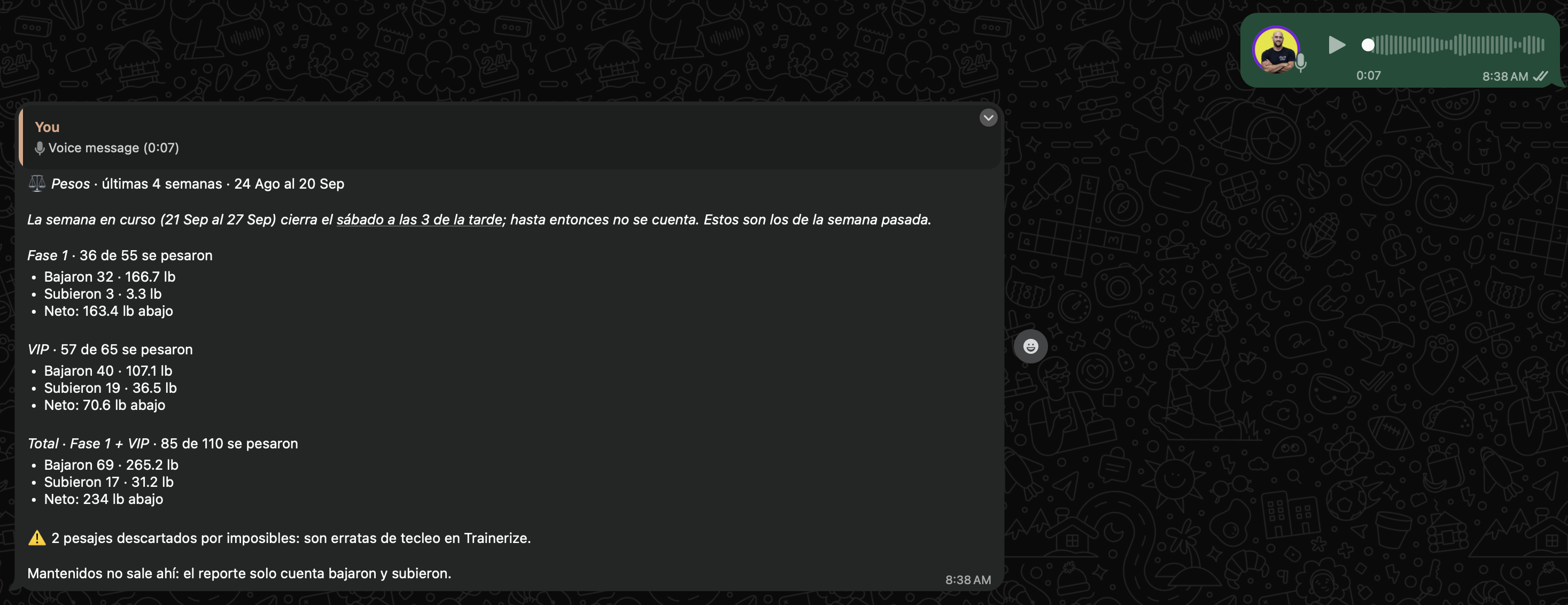
Original screenshot supplied by the founder, September 21, 2026. Its reporting window and cohort totals need reconciliation; the figures are not validated outcomes or results caused by an agent.
Recreated from the supplied exchanges. Requests are paraphrased; all client labels, measurements and chart values below are fictional teaching data.
- 01
Start with the whole team.
Ask the question in everyday language. Emily’s captured response groups the report by program and notes missing or excluded data.
What the agent doesReads the available records and turns them into an overview the coach can review.
- 02
Follow up with a focused question.
The next voice message asks who gained weight. The actual exchange shows a read-only query comparing each record’s latest measurement with a previous measurement, followed by a filtered list.
What the agent doesCompares existing data, calculates the change and returns the records that match the question.
- 03
Open the context behind one result.
One more question brings back a record summary, recent notes and a graph. The original contains personal details; this example shows the structure using fictional information.
What the person doesReviews the history, checks the source and decides how to follow up. Emily retrieves the context; the coach provides the coaching.
02 / Move the work forward
A sale becomes a team handoff.
The supplied sales screenshot shows the team sharing an intake, SPARX organizing it, and Emily acknowledging registration. The next action stays visible: activation is still pending.
Reconstruction of a real handoff. Client, medical, contact and payment details omitted.
- 1Sales team
Intake shared
A team member posts the new registration details in the staff chat.
- 2SPARX
Handoff organized
SPARX formats the intake, includes orientation details and tags Emily.
- 3Emily
Registration acknowledged
Emily confirms the record and explicitly leaves activation to the team.
The boundary is part of the work. The message says the client remains inactive and receives nothing until the team activates the record in the panel.
03 / Keep the owner informed
SPARX connects reports with the owner’s day.
The screenshots also show Emily reporting on her week and SPARX acknowledging that the report was archived. SPARX separately describes scheduled ads reporting, research and operational alerts.
The morning ads brief
SPARX describes pulling Meta Ads data, calculating cost per lead and sending a campaign summary to Lalo. These are fictional figures showing what that report helps someone compare.
| Campaign | Ad spend | Leads | Cost / lead |
|---|---|---|---|
| A | $120 | 15 | $8 |
| B | $140 | 10 | $14 |
A report can flag a difference. Pausing or scaling a campaign still requires the owner’s instruction.
The work behind the question
Our team needs answers from records it already keeps: who submitted an update, what was noted previously, and which follow-up is due. Finding those answers can interrupt coaching and create another status request for a colleague.
Gerardo “Lalo” Vera reports using two agents internally for approximately eight months. A technician maintains and develops them, while Lalo oversees how they work. Emily supports the coaching team; SPARX supports the owner’s reporting and coordination.
Defined actions. Human responsibility.
Emily’s described setup separates read-only database queries from named operations for specific requested updates. A captured sales handoff shows Emily acknowledging a new record while explicitly leaving activation pending. Preparing information does not automatically authorize the next business action.
The team remains responsible for coaching, reviewing exceptions, and approving changes outside the agreed task. Emily reports missing information or tool failures rather than treating an empty record as completed work. Those rules must also be checked in the actual tools and permissions.
What we can show, and what we still check
The owner supplied six screenshots: a sales handoff, the lookup conversation, and a weekly activity report for September 14–20, 2026. These show actual responses and reported activity. They do not independently verify every database write or message delivery.
We are not publishing hours saved, a success percentage, or a return-on-investment figure. Report periods and counting rules need reconciliation before their totals become performance claims. A useful test checks answers against the source, including missing data and exceptions.
Bring one question your team keeps asking.
Describe what people keep looking up, where the information lives, and who needs the answer. In an English or Spanish demo, we can discuss a bounded first task and what a person should review.
Sign up for a call